• Skip to content
  • Skip to footer

iKAN Software

Secure. Simple. Document Solutions

MENUMENU
  • Solutions
    • Industry Specific Solutions
      • Energy
      • Finance, Insurance, Real Estate
      • Transport & Logistics
      • Manufacturing
      • Education & Training
    • Department Specific Solutions
      • Maintenance Invoice Processing for CMMS
      • Accounts Payable Invoice Processing
      • Division Order Solution
      • Human Resources Automation
      • Mailroom Automation
      • Legal Department Automation
  • Products
    • iKAN’s Virtual Document Center
    • iKAN ScanNow
  • About
    • About iKAN Software
    • Partners
    • Testimonials
    • Privacy Policy
  • Resources
    • Videos
    • Case Studies
    • Blog: iKANGration
    • Request a Demo
    • Technical Architecture Diagrams
  • Contact Us
  • Right of Menu Area

    713.426.4526

Blog

September 4, 2020 By David Houlston

Making Invoices Cost Less

Over the years, the cost to process Invoices has changed. The way that Invoices are processed within a business has also changed. Invoice processing has grown for most businesses from a small group of people manually entering data to whole departments that deal with Credits, Payables and Finance. Invoices can can trigger multi-step workflows, spawn other processes that involve managers and executives and can be included in multi-document matching (referred to as “3 way matching”).

What is not usually looked at is the cost to process an Invoice. This includes a review and understanding of the human “hands” that touch an invoice. After review, there are usually simple changes to the process that can simplify and make efficient the flow of the Invoice. Printing a PDF to enter the data is a definite no no to!

What’s important to realize is that the actual cost to process the data from the Invoice can be expensive just by looking at who is actually processing (or ‘keying’) the data. These can be expensive accounts staff that are better served in other areas of the Finance department. It could be that there are large teams that are used in a reactionary scenario – at the end of the month, all hands on deck and then scale back.

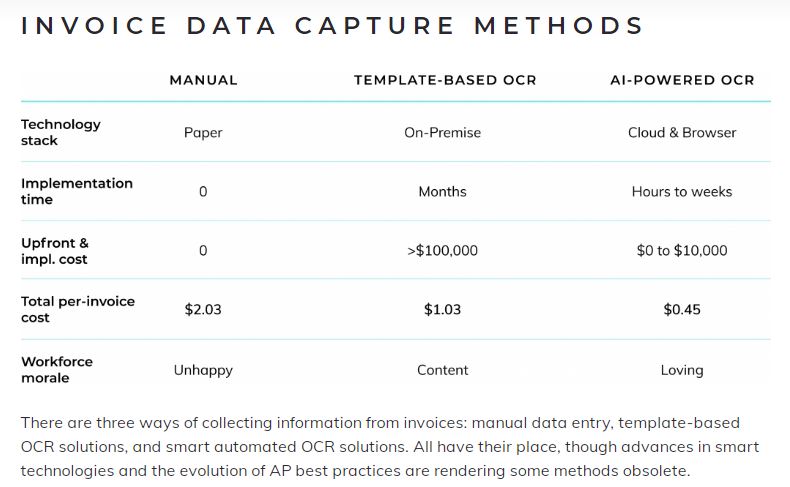
There are 3 generally accepted methods of data capture. From manual entry to Artificial Intelligence, businesses will adopt the method that best fits what they need. Looking at the table below and focus on the ‘Total per-Invoice Cost”, the metric that needs to be coupled with this is the volume of Invoices. Processing 100 Invoices per month will cost a lot less than 1,500 Invoices.

Notice the last line – Workforce morale.
MANUAL DATA ENTRY

Here’s a breakdown of a typical manual invoice data entry process:

Receive paper invoice. Open accounting software. Look at paper invoice. Enter PO number into header field for PO number in accounting software. Look at paper invoice. Enter vendor name into header field for vendor name in accounting software. Look at paper invoice….

You get the idea. We could replace “paper invoice” with, say, “pdf invoice”, the difference being that the data entry clerk copy-pastes invoice details into accounting software instead of typing them. Day after day after day.

Manual data entry in any context is clearly a tedious spirit-draining task, regardless of whether your company outsources it or keeps it in-house. And as the spirit wanes, the potential for errors rises. As melodramatic as that sounds, it’s true, and the fact remains that manual invoice data capture can create all kinds of problems, including late payments, lost early payment discounts, and friction with vendors.

OCR

With the arrival of OCR came the hope of dramatic reductions in man-hours spent on invoice data extraction. OCR software scans printed documents, or reads electronic documents, and collects the text contained within them. AP professionals use this solution to capture invoice data, which they then process and store.

There are two OCR variants: template-based and automated. Template requires manual effort to maintain and prevent errors; automated offers the option of running an accurate and efficient touch-less AP process.

Template-based OCR

In this approach to data capture, OCR software reads an invoice and captures data according to predefined rules and templates. It has come a long way in its decades-long history as the go-to solution for digital invoice processing. Template-based OCR extracts data more accurately now, just as long as the software is reading characters in layouts it’s been trained to understand. This means your AP colleagues must set up templates and rules for every format of invoice they receive. 

If your business has all its suppliers submit invoices with the exact same layout, this is a pretty feasible solution. However, the invoices your company’s AP unit is processing are more likely to be formatted differently. And at least one staff member has to handle such tasks as accuracy verification, PO matching, and initiating approval and payment processes.

Smart OCR invoice scanning

A smart OCR invoice scanning platform understands the information it is extracting. Applying machine learning technology, the software learns how to recognize and capture relevant data in various document layouts with continued use. This eliminates the need to manually set up new templates every time the AP team receives new invoice layouts. This is about as “set it and forget it” as an invoice data capture service can get.

You can set up a smart OCR invoice scanning solution to fully automate AP data entry. You could even go so far as to create a completely touch-less AP process if your business is comfortable with having software approve invoices. However, the reality is that you’re always going to need a human in the loop to monitor accuracy and ensure every step is running smoothly.

While an automated invoice data capture solution may seem like an obvious upgrade for AP, finance professionals are understandably a bit wary about progressive technologies like AI and machine learning, as well as the very idea of cloud-based SaaS solutions. If you’re committed to introducing cognitive data extraction to your company’s AP workflow, you might need to put some extra effort towards getting buy-in from your company’s decision-makers. 

STRUCTURED VS. SEMI-STRUCTURED DATA

Documents with structured data are identical in terms of structure and appearance. Information is categorized, labeled, or positioned clearly. For example, the fields in a multiple choice test are going to be laid out exactly the same for every student taking the test. So a traditional template-based OCR solution can easily process documents with structured data, with minimal setup and maintenance requirements.

Invoices, on the other hand, are semi-structured documents, meaning they have the same basic structure but may have different layouts and content. They contain certain constants, such as date, vendor name, and total amount due; they also have a number of variables, including line items, discounts, or penalties. The location of each header field may also differ greatly from invoice to invoice. In this case, a template-based OCR solution can waste man-hours and cost, and increase the potential for errors. A smart OCR scanning platform, however, gets better at processing semi-structured documents with continued use. To get the best possible results, make sure your solution includes Machine Learning (“ML”). Machine learning should be as automatic as possible – you don’t need to burden your users with extra steps that are not related to efficiently processing the Invoice. The system should ‘monitor’ human interaction and react to those changes – learning as it goes.

HELP GROW YOUR BUSINESS WITH BETTER INVOICE DATA CAPTURE

When considering which areas of your business could use an upgrade, take a good look at your company’s AP process. You might find opportunities to introduce efficiencies, boost productivity, and cut costs across departments simply through improved invoice processing. Of the technological solutions that can help you achieve this, Make sure you spend some time looking into specialized intelligent invoice data capture software. A smart OCR invoice scanning platform that automates accounts payable data entry could end up being vital to helping your company achieve its strategic objectives.

Whether you’re just coming to understand the undeniable benefits derived from invoice automation, facing the fact that current processes won’t support future growth, or maybe an early adopter recognizing that what was once cutting edge is no longer cutting the mustard—it may be time to kick off an improvement project in your AP.

Look closely at the platform used to deliver your solution – using the Cloud is a flexible solution. Your I.T. department does not worry about servers or software updates. Integration for your users is usually straight forward and the results are as good as an On Premise Solution.

August 28, 2020 By David Houlston

Getting to grips with Invoices

Traditionally, an AP improvement project takes root when the awareness of the problems associated with manual processing and associated benefits of automation are recognized. Case in point is Wildman Business Group. Eighteen months ago, the Assistant Controller of Wildman attended a session about AP Automation at a popular industry trade show.  It was the first time she was introduced to the technology and associated benefits, and was amazed by its potential.  She brought it back to her CFO and less than a year later, Wildman deployed an intelligent invoice solution to automate the data capture of its 48K invoices per year.

The benefits of AP Automation are well documented by industry analysts and research firms. With automation, companies see more than four times increase in the number of invoices an employee can process per year, and spend 30% less time responding to supplier inquiries. With the right technology, invoice cycle time will decrease to 5 days or even shorter, which can foster strong supplier relationships and allow for early payment discounts. Paper-based processes can cost five to ten times more than automated processes. In fact, a recent study by prominent research firm reports that the average cost to process a single invoice is more than $13, compared to best-in-class performance of less than $3. Accuracy is yet another big benefit.  The human error factor is always in place as the result of manual entry of invoice information into accounting systems.

Lately, we’re seeing a strong trend, particularly with midsize organizations, that the growth of the company fuels the interest in invoice automation. With growth, there are more invoices to process and decision makers need a way to manage the increased volume. A growing transportation and logistics company in the northwest processes, 150K invoices per year and recently took the leap to invest in invoice automation. The primary reason? Automation allows the company to manage the influx of invoices without having to hire additional full time employees.

The newest trend is toward replacing outdated solutions. Invoice automation software was first introduced nearly two decades ago, and many businesses—especially the larger enterprises—adopted the technology along the way. Today, the leaders of those same businesses are finding that those solutions can’t compare to the performance of newly-developed technology.

The regional operations of an international food service, processes 100K invoices per year and saw a need to replace its outdated capture technology due to lack of flexibility and accuracy. In addition, the legacy solution provider had been acquired twice in the last two years, and lack of support was becoming an issue.

Whether you’re just coming to understand the undeniable benefits derived from invoice automation, facing the fact that current processes won’t support future growth, or maybe an early adopter recognizing that what was once cutting edge is no longer cutting the mustard—it may be time to kick off an improvement project in your AP.

August 21, 2020 By David Houlston

5 Advantages of Automating Manual Processes In Your Business

Automating small tasks can make a huge impact, here’s why…

A recent survey of 280 US companies found 62% of business owners have identified three or more major inefficiencies in their manual business processes that could be resolved with automation.

As new forms of automation are transforming the work world, more and more companies are taking the leap from manual business processes to automated solutions.

Automation opens the doors to a more efficient, productive, and flexible work model. Automation can not only drive efficient decision making and improve allocation of resources, but also increase employee productivity.

Here are 5 ways automating manual processes can improve business workflow and save operating costs for your business…

1. Higher Efficiency and Productivity

Human errors are inevitable.

Implementing automated processes minimizes errors and redundancies, resulting in much more efficient work.

On average, managers spend at least eight hours a week on manual data tasks- that’s one full work day per week! Automation relieves mundane tasks, allowing employees to focus on high-value work.

The majority of manual tasks are not part of an employee’s core job function. It takes time away from a manager’s abilities to focus on strategic initiatives that propel the organization forward.

McKinsey estimated that automation could increase productivity growth globally by 0.8 to 1.4 percent annually. Your employees are your most valued resource. Relieving them of tedious tasks and having them focused on developing their skill sets for their role will translate to more profits.

2. Reduced Time and Costs Saving

Automation translates to more labor-hours available to you. 

For processes that consist of many lower-level administrative tasks, automation can provide significant time and cost savings.

By reducing the time employees need to complete their work, as well as the number of employees needed on each task, automation translates to more hours focused on doing work that drives profits. Your employees will have to focus on high-level work that drives your business forward.

Another area where you can see cost savings is in your collection processes. By transitioning to an electronic business payment network, processing invoices can save significant time and labor costs.

For example, Bill.com reports by syncing their bill payment system with QuickBooks, businesses can cut bill payment time in half. As a result, vendors can rejoice by being paid two to three times faster electronically than with the manual method. The Wall Street Journal estimated that the average small business spends $12 to pay a bill. By using Bill.com to pay bills electronically, the cost to pay a bill can be slashed to around $1.50.

3. Improving Compliance

Automated processes empower compliance with regulations and audit trails.

Most businesses have large volumes of data on different interfaces- meaning employees may be using different processes. If an employee gets confused or any information goes unaccounted for, there is going to be a hiccup in your audit trail. Automation takes care of this.

4. Financial Insight

Decisions can’t be made without information. Automation puts information at your fingertips so you aren’t making hasty decisions based on your gut.

Automation has the biggest impact on financial intelligence because it allows you to get more information and get it faster than if you did things manually.

You can gain deep insight into your processes with analytics and reports, thereby aiding decision-making.  By downloading or syncing data, you’re able to capture things that are harder or factors that you may have missed with manual processes.

This is demonstrated primarily with job costing, decision making, and cash flow. Job costing allows you to capture all costs of a job so you can price your items appropriately, ensuring profitability down the line. With proper real-time billing and coding, data is captured more accurately, resulting in a more accurate picture of the true costs of a job.

5. Increasing Your Ability To Scale

A scalable back office is key to business growth.

Manual processes make scaling difficult in response to an increase in demand.  Automation makes this effortless.

The very nature of automating technology allows business owners to establish scalable, customizable back offices that will be equipped to provide everything the business needs to evolve and grow. Businesses are instantly able to implement changes that come from headquarters.

With an intelligent infrastructure already built into your business model and operations, you have the ability to scale your back office to meet your business’s changing needs throughout every stage of growth.

Reach to us for free discussion and free demonstration of how we can help with all 5 of these great business automation points.

« Previous Page
Next Page »

Footer

Contact Us

Mailing Address:
404 West 33rd Street
Houston, Texas
77018

713-426-4526

Free Trial or Demo Request

To receive a product demo, simply fill out this form.

Alternatively, call 713-426-4526 or email sales@ikansoftware.com to schedule an appointment.

Copyright © 2026 · iKAN Software, LLC · All rights reserved

  • Terms of Use
  • iKAN Software Privacy Policy