
• Skip to content
  • Skip to footer

iKAN Software

Secure. Simple. Document Solutions

MENUMENU
  • Solutions
    • Industry Specific Solutions
      • Energy
      • Finance, Insurance, Real Estate
      • Transport & Logistics
      • Manufacturing
      • Education & Training
    • Department Specific Solutions
      • Maintenance Invoice Processing for CMMS
      • Accounts Payable Invoice Processing
      • Division Order Solution
      • Human Resources Automation
      • Mailroom Automation
      • Legal Department Automation
  • Products
    • iKAN’s Virtual Document Center
    • iKAN ScanNow
  • About
    • About iKAN Software
    • Partners
    • Testimonials
    • Privacy Policy
  • Resources
    • Videos
    • Case Studies
    • Blog: iKANGration
    • Request a Demo
    • Technical Architecture Diagrams
  • Contact Us
  • Right of Menu Area

    713.426.4526

Blog

Digital Transformation

April 16, 2019 By Admin

Top Digital Transformation Trends

Digital Transformation is the big buzzword in the industry right now. Innovation is the way of the future and change is how we grow, so it’s important to keep up with the latest advances available to understand how those technologies can benefit your business.

Here are some current trends and predicted developments as we head into 2020.


Existing ERP Implementations will Become Outdated

Companies that embrace true digital transformation will continue to thrive, as they deliver value beyond the traditional efficiency gains that result from ERP enhancement.

Rather than simply updating back-office systems and implementing a standalone ERP, businesses will leverage a variety of technologies in order to stay relevant and highly competitive.


Increasing Popularity from Data and Analytics to Machine Learning and AI

While the amount of data generated is growing, research indicates that businesses are only using approximately 1% of data effectively.

Though many companies can provide analytics, implementing intelligent platforms that both capture and interpret data is necessary in order to harness its full potential. As early as next year, data capture capabilities, analysis, and overall utilization will increase significantly. Early adopters are already experiencing significant return from machine learning and AI.


The Cloud Trend Will Continue

While on-premise systems may never become obsolete, companies are increasingly drawn to Cloud ERP systems and other Cloud Software—owing to the influence of vendors and ERP product investment.

Cloud computing will likely become the first implementation choice for several reasons: off-premise access, no on-prem installation, hardware upgrades, or software maintenance.


Digital Strategy will Become a Prerequisite for Digital Transformation Success

Rapid tech advances are forcing large companies to adapt quickly.

With so many options available, companies will require a digital strategy that either serves a particular set of individuals (customers, employees, partners, suppliers, etc.) or serves the needs of a particular business set (HR, finance, marketing, operations, and so on). Such a strategy should take into account technological, operational, and organizational perspectives.

A clear digital strategy will build a strong foundation for success and help businesses choose properly and invest wisely.


More Companies will Focus on Two-Tier Digital Transformation Approaches

Rather than assume that a single vendor or software option can deliver groundbreaking solutions, organizations will employ multiple systems or department-specific solutions.

The proliferation of available integration tools makes two-tier transformation a viable option for many companies and will lead providers to offer more departmental solutions that focus on very specific needs.

August 10, 2017 By Brett Cox

What is Document Imaging?

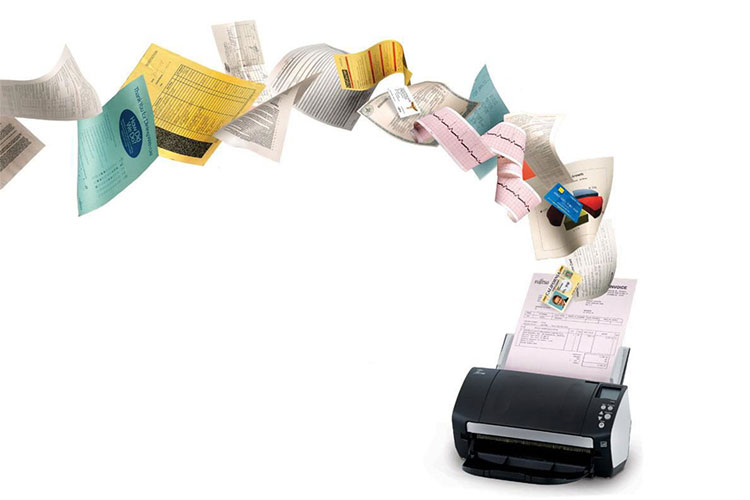
Imaging allows organizations to capture paper-based information and convert it to electronic images that are stored in a computer electronically.

What Is Imaging?

Imaging is how you’ll remove the paper from your office, digitize it, and enable a more streamlined business process.

Whether you call it imaging, electronic imaging or document imaging it is the technologies that enable users to scan hard copy documents into a computer system and store them in digital format. These technologies enable users to index or enter “metadata” into the system and always utilize some form of storage technology to save the digital version of the document.

If you are looking for a definition to document imaging, the following are official definitions:

Document imaging  – Process of capturing, storing, and retrieving documents regardless of original format, using micrographics and/or electronic imaging (scanning, OCR, ICR, etc.). (ISO 12651-1)

Electronic imaging – Technique for inputting, recording, processing, storing, transferring and using images. (ISO 12651-1)

Most documents are created and stored electronically. Nearly every organization, however, has a large volume of documents that currently only exist in a paper format. Document imaging or imaging, allows organizations to capture paper-based information and convert it to electronic images that are stored in a computer electronically.

There are several reasons why organizations decide to transform these paper documents and make them available electronically:

  • Accessibility
  • Ease of access
  • Enables full-text search
  • Security
  • Space savings

There are four basic components to document imaging systems:

  • input
  • identification (indexing)
  • storage
  • retrieval

The input components typically consist of multiple single-sided (simplex) and/or double-sided (duplex) document scanners (or other input devices such as facsimile). The scanning stations are used to convert hard copy documents into a digital format for subsequent storage and management in the document imaging system. The identification (indexing) components allow users to identify (or index) this digital information allowing them to be retrieved at a later date and all types of information required by the end-user organization to fully track all necessary metadata).

The storage part of the system consists of various components connected to the document management or workflow server and are used to store, retrieve and manage digital information. The retrieval part of the system consists of the user issuing a request for information that is then processed by the server. These requests are processed and the information is retrieved from the appropriate storage media connected to the server.

Imaging can be a costly process and because of that it deserves attention and analysis. Even though imaging is getting easier to manage with all of the various types of scanning hardware available, the big steps in an imaging project are:

  • Sorting the documents
  • Preparing them for scanning
  • Scanning
  • Indexing the scanned documents so they can be retrieved and searched
  • Storing in a system

It is easy to understand sorting and preparing the documents will require a lot of time and effort. What is perceived as a simple task that needs to take place during document preparation, removing all of the staples and paperclips can be a mammoth task when you consider the volume of paper to be scanned.

Another important and time consuming task is the indexing of the documents. The quality and effort put into this activity determines how well the documents can be found.

August 10, 2017 By Brett Cox

What is Document Management (DMS)

Document management, often referred to as Document Management Systems (DMS), is the use of a computer system and software to store, manage and track electronic documents and electronic images of paper based information captured through the use of a document scanner.

What is Document Management (DMS)?

Document management is how your organization stores, manages and tracks its electronic documents.

According to ISO 12651-2, a document is “recorded information or object which can be treated as a unit”. While this sounds a little complicated, it is quite simply what you have been using to create, distribute and use for years.

Now, we can define document management as the software that controls and organizes documents throughout an organization. It incorporates document and content capture, workflow, document repositories, COLD/ERM, and output systems, and information retrieval systems.  Also, the processes used to track, store and control documents.

Document management is one of the precursor technologies to content management, and not all that long ago was available solely on a stand-alone basis like its imaging, workflow, and archiving brethren. It provides some of the most basic functionality to content management, imposing controls and management capabilities onto otherwise “dumb” documents. This makes it so that when you have documents and need to use them, you are able to do so. Some of the key features in document management include:

  • Check-in/check-out and locking, to coordinate the simultaneous editing of a document so one person’s changes don’t overwrite another’s
  • Version control, so tabs can be kept on how the current document came to be, and how it differs from the versions that came before
  • Roll-back, to “activate” a prior version in case of an error or premature release
  • Audit trail, to permit the reconstruction of who did what to a document during the course of its life in the system
  • Annotation and Stamps,

Document management eventually was subsumed into content management in no small measure because there is more information available to us today than ever before, and most of it is not being created by us.  Thanks to the mainstreaming of a whole range of sources like the Web, thumb drives, smartphones, etc., the need has accelerated to deal with information of all kinds: not just in terms of more media types like text vs. images vs. voice files, but also in terms of how structured – and thus how readily managed – it all is.

Document management systems today range in size and scope from small, standalone systems to large scale enterprise-wide configurations serving a global audience.  Many document management systems provide a means to incorporate standard physical document filing practices electronically. These include:

  • Storage location
  • Security and access control
  • Version control
  • Audit trails
  • Check-in/check-out and document lockdown.


Document management, while still recognized and utilized independently, it is also a common component found within an Enterprise Content Management environment.

« Previous Page
Next Page »

Footer

Contact Us

Mailing Address:
404 West 33rd Street
Houston, Texas
77018

713-426-4526

Free Trial or Demo Request

To receive a product demo, simply fill out this form.

Alternatively, call 713-426-4526 or email sales@ikansoftware.com to schedule an appointment.

Copyright © 2026 · iKAN Software, LLC · All rights reserved

  • Terms of Use
  • iKAN Software Privacy Policy